Payments
How to pay your bill
Pay your monthly internet bill in seconds — via mobile banking or bank transfer. Your bill updates automatically.
Mobile banking
Pay from your phone
Follow the steps for your preferred wallet. Your bill is updated automatically the moment payment completes.
Pay via bKash
Pay in under a minute
-
1
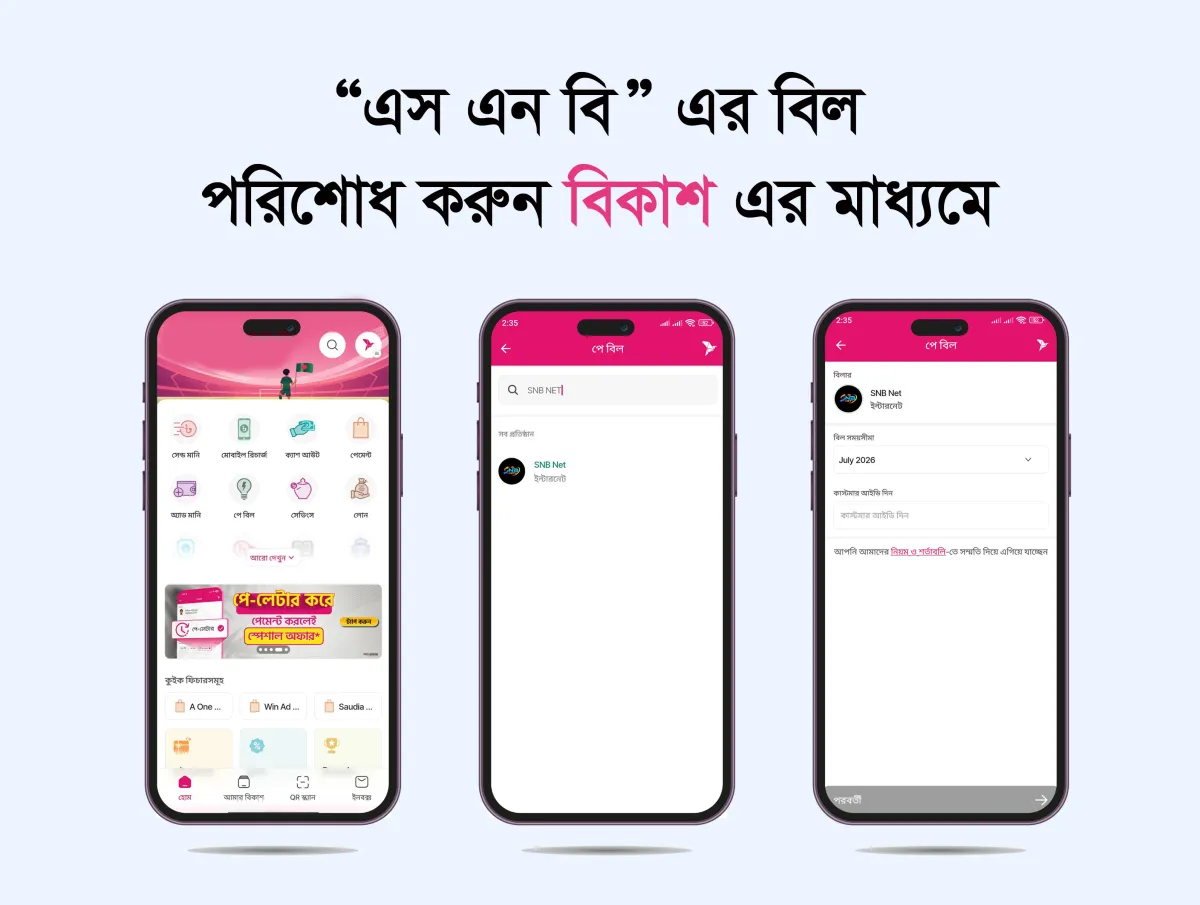
Open the bKash app and tap পে বিল option.
-
2
In পে বিল option you'll find SNB NET Simply tap on it and follow the next step.
-
3
Now select your internet billing বিল সময়সীমা box & input your customer in বিল একাউন্ট নম্বর দিন box.
-
4
If you want to save the payment info for quick payment, you can simple tick the checkbox ভবিষ্যৎ বিল পেমেন্টের জন্য একাউন্টটি সেভ করে রাখুন
-
5
After that, tap the পে বিল করতে এগিয়ে যান button & hold the pay button for a few second. You're done!
Bank transfer
Prefer a bank transfer ?
Transfer to any of our accounts below, then share the reference with our support team.
BRAC Bank PLC.
- Account name
- M/S SNB NET
- Account no.
- 1543205181461001
- Routing no.
- 060263290
- Branch
- Mohammadpur
After transferring, email your slip to mssnbnet@gmail.com or call +8801877306666 to confirm.
Stuck on a payment?
Our team is here every day, Every day, 9am – 10pm.